
Seagate IronWolf 2TB Review: NAS HDD Specs & Performance
Yes. The article has good SEO coverage and useful technical information, but it still has several patterns that make it feel AI-generated: repeated phrases such as “this makes it useful,” “for users who,” “the important point,” and repeated explanations of the same NAS benefits.
I would also keep the ST2000VN003 = 5400 RPM clarification, because that is an important product-accuracy point already established in your supplied content. I have not added new specifications beyond the material you provided.
Below is a more natural, human-style version. I’ve kept the SEO intent, commercial intent, headings, specifications, and buyer-focused information while making the writing less predictable.
Seagate IronWolf 2TB NAS Hard Drive Review: Specs, Performance & Features
If you are setting up a home NAS, upgrading an existing storage server, or looking for a dedicated drive for backups, the Seagate IronWolf 2TB is a practical option to consider.
The IronWolf range is built specifically for network-attached storage (NAS) rather than ordinary desktop computers. That means the focus is not simply on storing files. These drives are designed for systems that may run continuously, handle regular file transfers, and operate alongside other hard drives in a NAS enclosure.
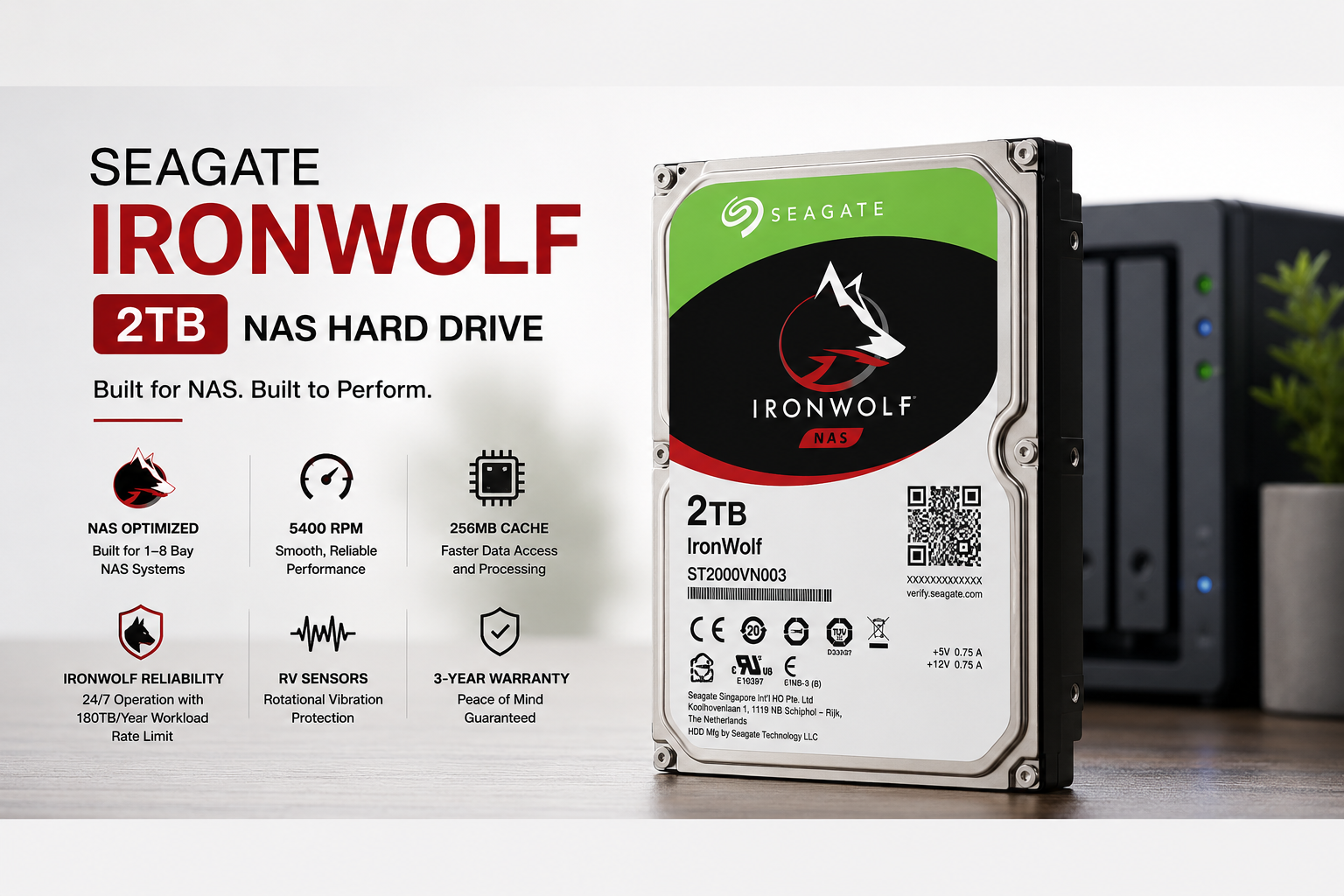
The Seagate IronWolf ST2000VN003 comes with 2TB of storage, a 3.5-inch form factor, SATA 6Gb/s connectivity, 256MB cache and CMR recording technology. Seagate also specifies support for NAS systems with up to eight drive bays, a 180TB-per-year workload rate and a three-year limited warranty.
There is one specification worth checking before you buy.
The Select2Shop listing currently mentions 5900 RPM, while the supplied Seagate documentation identifies ST2000VN003 as a 5400 RPM model with 256MB cache. The 5900 RPM 2TB IronWolf model is ST2000VN004, which has 64MB cache.
So, if you are specifically buying the ST2000VN003, the model number is more important than the RPM figure shown in a retailer title.
With that cleared up, let's look at what this 2TB NAS hard drive actually offers.
Seagate IronWolf 2TB Specifications
| Specification | Seagate IronWolf ST2000VN003 |
|---|---|
| Capacity | 2TB |
| Drive Type | NAS HDD |
| Form Factor | 3.5-inch |
| Model | ST2000VN003 |
| Spindle Speed | 5400 RPM |
| Cache | 256MB |
| Interface | SATA 6Gb/s |
| Recording Technology | CMR |
| Drive Bays | 1–8 bays |
| Sustained Transfer Rate | Up to 180MB/s |
| Workload Rate Limit | 180TB/year |
| RV Sensors | Yes |
| Error Recovery Control | Yes |
| Warranty | 3 years |
| Weight | Approximately 415g |
| Height | 20.2mm |
| Width | 101.85mm |
| Length | 146.99mm |
These specifications are based on the Seagate documentation provided for the ST2000VN003.
What Is the Seagate IronWolf 2TB?
The Seagate IronWolf is a series of hard drives designed for NAS systems.
A NAS gives you a central place to store files that can be accessed by computers, phones, TVs and other devices on your network. It can be used for everything from family photos and documents to media libraries and computer backups.
Because a NAS can remain switched on for long periods, the hard drive inside it needs to be suited to that type of workload.
IronWolf drives include features aimed at NAS environments, including 24×7 capability, RAID optimisation, Error Recovery Control, S.M.A.R.T. monitoring and vibration management.
The ST2000VN003 is the 2TB option in this configuration. For a small home NAS or basic office storage system, that capacity can be enough to get started without spending more on a larger drive than you currently need.
Is 2TB Enough for a NAS?
For some users, 2TB is plenty. For others, it can disappear surprisingly quickly.
A 2TB IronWolf drive can be used for:
Computer and laptop backups
Family photos
Documents
Music collections
Movies and TV shows
Work files
Shared folders
Personal cloud storage
Certain security-camera storage setups
The amount of usable space will depend on how your NAS is configured.
For example, two 2TB drives configured as a mirror will not give you 4TB of usable storage. One drive is effectively used to maintain a copy of the data on the other.
That may sound like a poor trade-off if you're only looking at capacity, but redundancy can be valuable when a drive fails.
If your NAS will hold a large video collection or backups from several computers, it may be worth starting with a larger-capacity drive instead.
5400 RPM vs 5900 RPM: Which Model Is This?
The RPM specification deserves special attention with the ST2000VN003.
The retailer listing supplied for this review currently describes the drive as 5900 RPM. However, the Seagate specification identifies ST2000VN003 as a 5400 RPM drive with 256MB cache.
The 5900 RPM 2TB model is ST2000VN004, and that version has 64MB cache.
In simple terms:
ST2000VN003 → 5400 RPM + 256MB cache
ST2000VN004 → 5900 RPM + 64MB cache
That distinction matters when comparing two IronWolf drives.
A 5400 RPM drive isn't necessarily a bad choice for a NAS. NAS performance depends on much more than spindle speed. Your network connection, NAS processor, RAID configuration, workload and number of simultaneous users can all affect how quickly files move.
If you specifically want the 5900 RPM model, check the model number before placing an order.
What Does the 256MB Cache Do?
The ST2000VN003 has 256MB of cache.
A hard drive cache is a small amount of faster memory built into the drive. It helps the drive manage data during read and write operations.
It does not make an HDD perform like an SSD, but it can help with certain workloads.
For a NAS, however, it makes more sense to look at the entire drive rather than judging it by cache size alone. The ST2000VN003 combines its 256MB cache with CMR recording, SATA 6Gb/s connectivity and NAS-oriented features.
For backups, file storage and media streaming, those characteristics are more meaningful than simply comparing cache numbers between drives.
CMR Recording: Why It Matters for NAS
The ST2000VN003 uses CMR, or Conventional Magnetic Recording.
CMR is widely used in storage systems where predictable write behaviour is important. That can make it a sensible choice for NAS workloads involving regular writes, updates and RAID configurations.
A NAS using this type of drive may handle tasks such as:
Regular file transfers
Computer backups
Media storage
RAID workloads
Database-related storage
Multiple users accessing shared files
This doesn't mean every NAS needs a CMR drive, but it is a useful characteristic to have when the storage system will be regularly writing and updating data.
Built for NAS Environments
One of the biggest differences between an IronWolf drive and a basic desktop HDD is the environment it is designed for.
The ST2000VN003 is specified for NAS systems with 1 to 8 drive bays. It also includes a rotational vibration sensor and Error Recovery Control.
Vibration becomes more relevant when several mechanical drives are installed in the same enclosure. Each drive has moving components, and multiple drives operating together can create a more demanding environment than a single desktop HDD.
NAS-specific features are designed with that use case in mind.
That said, NAS-focused hardware doesn't make a hard drive failure impossible. Every mechanical drive can fail, which is why important files should always have a separate backup.
Seagate IronWolf 2TB Performance
The ST2000VN003 uses a SATA 6Gb/s interface and has a specified sustained transfer rate of up to 180MB/s.
For common home NAS tasks, that is sufficient for many workloads.
You can use the drive for:
Large file transfers
Photo backups
Video streaming
Computer backups
Shared documents
Media-server storage
Real-world performance will vary.
Your NAS processor, network connection, RAID setup, file sizes and the number of people accessing the NAS at the same time can all affect transfer speeds.
For example, on a typical 1Gb Ethernet network, the network connection itself can become the bottleneck before the hard drive reaches its maximum sequential transfer rate.
So, simply choosing a drive with a higher advertised transfer speed does not guarantee that your NAS will feel faster.
Is the Seagate IronWolf 2TB Good for a Home NAS?
Yes, provided 2TB is enough for your needs.
The ST2000VN003 is well suited to common home-NAS tasks such as storing photos, documents, media and computer backups.
It can also be used as part of a RAID configuration with compatible drives.
For someone building a small NAS for the first time, 2TB can be a reasonable starting point. It keeps the initial storage cost manageable while providing enough room for everyday files.
However, storage requirements tend to grow.
If you already have a large media library or expect to back up several computers, buying a larger drive may save you from upgrading again in the near future.
Is the IronWolf 2TB Good for a Media Server?
A home media server is one of the more obvious uses for a 2TB NAS drive.
You can store movies, music and photographs on the NAS and access them from supported TVs, computers, phones and streaming devices.
For normal media streaming, the ST2000VN003 has enough performance for many home setups.
The NAS itself still matters, though. If several people are streaming different content at the same time, the processor, network and storage configuration can affect the experience.
The hard drive is only one part of the system.
Using the IronWolf 2TB for Backups
Backup storage is another strong reason to consider a NAS drive.
Instead of manually connecting an external drive every time you need to back up a computer, a NAS can stay connected to your home network and handle backups automatically.
The 2TB capacity can work well for a modest backup setup, although the actual amount you need depends on the number of devices being backed up and how many previous versions you want to keep.
There is one important distinction to remember:
RAID is not a backup.
RAID can help keep a NAS available when a drive fails, but it won't protect your files from accidental deletion, ransomware, hardware damage, fire or other disasters.
For important data, following a 3-2-1 backup strategy is a much safer approach.
Reliability and Workload Rating
Seagate specifies a 180TB-per-year workload rating for the ST2000VN003 and lists a 1 million-hour MTBF along with 600,000 load/unload cycles.
These numbers are useful when comparing storage products, but they should not be interpreted as a promise that your individual drive will last for a particular number of years.
Actual drive life can be influenced by factors such as:
Operating temperature
Workload
Vibration
Power conditions
NAS airflow
Usage patterns
Good ventilation and regular drive-health monitoring are still important, even when using a NAS-specific hard drive.
3-Year Limited Warranty
The ST2000VN003 comes with a 3-year limited warranty according to the supplied Seagate information.
That provides some additional reassurance when purchasing the drive.
Warranty coverage can depend on the region and the seller, however. If you're buying the drive in Pakistan, confirm the warranty arrangement before completing your purchase.
You can also check the current Select2Shop listing for availability and purchasing information.
Seagate IronWolf 2TB vs a Standard Desktop HDD
A standard desktop HDD can store files perfectly well, but a NAS places different demands on storage.
The IronWolf ST2000VN003 includes several features aimed specifically at NAS use:
NAS-focused firmware
Error Recovery Control
Rotational vibration sensing
CMR recording
Support for up to eight drive bays
RAID-oriented features
24×7 capability
That makes an IronWolf a more natural fit for a NAS than simply choosing the cheapest desktop HDD available.
If the drive will spend most of its time inside a NAS enclosure, paying for NAS-oriented features can make more sense than using a general-purpose desktop drive.
Who Should Buy the Seagate IronWolf 2TB?
Home NAS Builders
If you're putting together a small NAS for the first time, 2TB gives you a reasonable starting point for documents, photos and backups.
Home Media Server Users
The drive can provide central storage for movies, music and photographs that you want to access across your home network.
Users Who Need Centralised Storage
If several computers or devices need access to the same files, a NAS provides a convenient central storage location.
Backup Users
The ST2000VN003 is designed for regular NAS workloads, making it suitable for storing computer and device backups.
Small RAID Setups
The drive supports NAS environments with up to eight bays and includes features intended for multi-drive systems.
Who Should Choose a Different Drive?
The IronWolf 2TB isn't the best option for every situation.
If your priority is very fast application performance or extremely low access times, an SSD is a much better choice.
Likewise, if you already know that you need 8TB, 12TB or more, buying several 2TB drives may not be the most practical approach.
And if you only need an inexpensive hard drive for occasional desktop storage, paying extra for NAS-specific features may not make much sense.
Seagate IronWolf 2TB Pros and Cons
Pros
2TB storage capacity
Designed for NAS environments
256MB cache
CMR recording technology
SATA 6Gb/s interface
Up to 180MB/s sustained transfer rate
Supports NAS systems with up to eight drive bays
Rotational vibration sensor
Error Recovery Control
180TB/year workload rating
3-year limited warranty
Cons
Slower than an SSD
2TB may not be enough for large media libraries
Requires a 3.5-inch drive bay
NAS performance depends on the complete system
Retail listing currently shows an RPM discrepancy that should be checked before purchase
Final Verdict: Is the Seagate IronWolf 2TB Worth Buying?
The Seagate IronWolf 2TB ST2000VN003 is a sensible choice for a home or small-office NAS when 2TB of storage is enough.
It offers the features you would expect from a NAS-focused HDD, including 256MB cache, CMR recording, SATA 6Gb/s connectivity, support for up to eight drive bays and a 180TB-per-year workload rating.
It isn't designed to replace an SSD. Its job is different: provide relatively affordable, high-capacity storage for systems that may remain active for long periods.
The camera-like obsession with specifications isn't necessary here. For a NAS, the bigger question is whether the drive fits your workload and storage requirements.
There is one specification you should verify before buying this particular model. The supplied Select2Shop listing describes the ST2000VN003 as 5900 RPM, while the supplied Seagate documentation identifies ST2000VN003 as 5400 RPM with 256MB cache. The 5900 RPM model is ST2000VN004 with 64MB cache.
So, check the exact model number on the drive before ordering.
If you're building a home NAS for backups, shared files, personal cloud storage or a modest media library, the Seagate IronWolf 2TB ST2000VN003 is a practical option.
Frequently Asked Questions
Is the Seagate IronWolf ST2000VN003 good for NAS?
Yes. The ST2000VN003 is designed for NAS environments and supports systems with up to eight drive bays. It also includes NAS-oriented features such as rotational vibration sensing and Error Recovery Control.
Is the Seagate IronWolf ST2000VN003 5400 RPM or 5900 RPM?
The supplied Seagate documentation identifies ST2000VN003 as a 5400 RPM drive. The 5900 RPM 2TB model is ST2000VN004, which has 64MB cache.
How much cache does the ST2000VN003 have?
The ST2000VN003 has 256MB cache.
Does the Seagate IronWolf 2TB use CMR?
Yes. The supplied specifications identify the ST2000VN003 as a CMR drive.
How fast is the Seagate IronWolf 2TB ST2000VN003?
The specified sustained transfer rate is up to 180MB/s. Actual performance will depend on the NAS hardware, network, RAID configuration and workload.
Is 2TB enough for a NAS?
It can be enough for documents, photographs, backups and a modest media collection. If you have several computers to back up or a large video library, a higher-capacity drive may be a better choice.
Does the Seagate IronWolf 2TB come with a warranty?
The supplied information lists a 3-year limited warranty. Buyers should confirm the warranty terms that apply to their region and seller.
Can I use the IronWolf 2TB in a desktop PC?
It is a SATA 3.5-inch hard drive, so it can be used in compatible systems. However, its main purpose is NAS storage, where its NAS-oriented features are more relevant.
Is Seagate IronWolf better than a normal desktop HDD for NAS?
For a NAS, an IronWolf is generally a more appropriate choice because it is designed around NAS workloads and includes features such as vibration management and Error Recovery Control.